Overview
Goal of this experiment is to assess the feasibility of building my own SUPER SIMPLE queue managing stack with Supabase such that I can leverage it for other projects where the cloud provider options are simply not worth the constraints.
Problem
When running async tasks:
- I don't have visibility into an individual workflow's progress
- I don't have the ability to pause, resume, or cancel a workflow.
- I don't have the ability to retry a failed workflow from a specific step where each step might describe actions taken in a step so I can make a sensible decision as to wether I SHOULD retry or not.
- Traditional SAAS queue / async workflow tools don't allow me the flexibility of writing my own custom logic in ANY language in ANY architecture.
- A queue should not cost me anything to run EVER.
- Workflow tools like github actions are wildly constrained and don't allow me to have human's in the loop and optimise performance in the way I'd like.
- I should be able to use polling, webhooks, or streaming to trigger workflow actions.
Solution
A simple database schema and a client for interacting with the schema through a well defined abstraction by the workers (or frontend for performing retries).
Schema
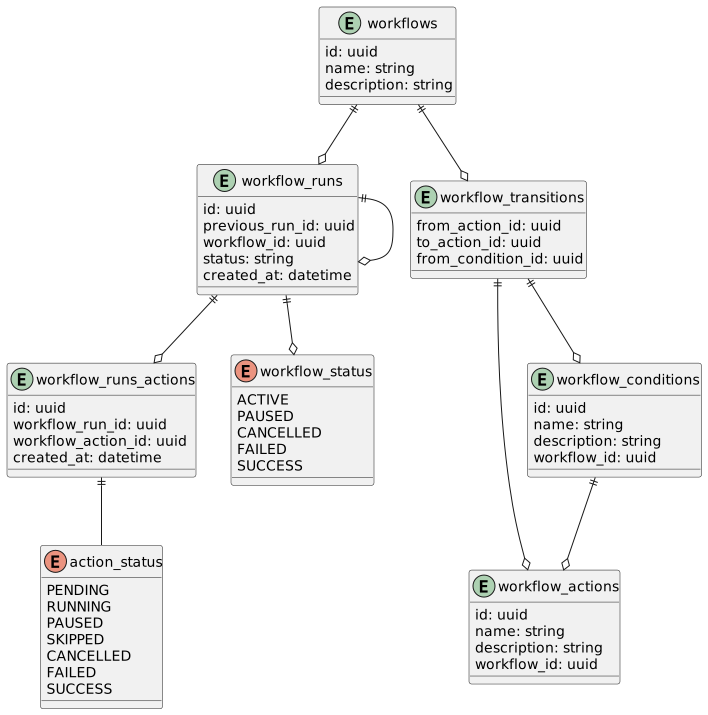
- workflows - table that basically just defines a name and a description of the workflow.
- workflow_actions - table that defines the steps of a workflow. Each step has a name, description, and a reference to the workflow it belongs to.
- workflow_conditions - a special type of action that tests the output from the "from_action" in the workflow_transition to determine wether the next action can be performed. When the condition is met, the workflow_condition action is marked as "success" and then next action will commence. When the condition is not met, the workflow_condition action is marked as "failed" and the workflow is marked as "failed".
- workflow_transitions - table that defines the order of execution for actions within a worklow.
- workflow_runs - table that defines the state of a workflow execution. This table is the most important as it defines the state of the workflow and the state of each action within the workflow.
- workflow_actions_runs - Per workllow run action, records the status of the action.
State
All workflows can take a serialized state called context. The workflow context can be accessed by any of workflow actions. Workflow context is completely immutable and can only be created when a new worker run is starting.
Another part of the workflows state is the "previous_run_id". When a workflow is retried, a relationship is created between the new workflow and the parent workflow.
Statuses
Actions
- pending - The action is waiting
- running - The action is currently being processed
- success - The action has completed successfully
- failed - The action has failed
- skipped - The action was skipped
- cancelled - The action was cancelled
- paused - The action was paused
Workflows
- active - The actions within the workflow are being processed
- failed - One of the success required actions has failed
- success - All requierd actions have completed successfully
- cancelled - A required action has been cancelled
- paused - A required action in the workflow has been paused
Workflows also have a derived status called "terminal" which is a boolean that is true when the workflow is in a terminal state.
Client
- listenForWorkflow - in case there exists workers that need to perform some task whenever a new workflow starts or ends.
- listenForAction - to be able to watch status changes on action.
- eg. When the action status goes to "pending" the worker can start processing the action IFF there either does not exist a transition for the action (start action OR the transition action's from action is in the correct status as defined in the condition status to continune to the next action).
- startAction - Changes the status of the action from "pending" to "running".
- failAction - changes the status of the action from "running" to "failed".
- completeAction - changes the status of the action from "running" to "success".
- retryAction - creates a new entry in workflow_runs_actions and set the status to pending.
- restartWorkflow - create a new entry in the workflow_runs table and sets the status of the first action to pending.
- canRestartWorkflow - Either there are no previous workflow runs OR the last workflow_run is in a terminal state.